Developer Guide
Acknowledgements
-
This project is based on the AddressBook-Level3 project created by the SE-EDU initiative.
-
Most of the images in UI are taken from Feather - a collection of simply beautiful open source icons.
-
The UI design is inspired by Warehouse Management System by Ashkan Fazeli
Setting up, getting started
Refer to the guide Setting up and getting started.
 Note: The
 .puml files used to create diagrams in this document can be found in the diagrams folder. Refer to the PlantUML Tutorial at se-edu/guides to learn how to create and edit diagrams.
Table of Contents
- Design
- Implementation
- Link to guides
-
Appendix: Requirements
- Product scope
- User stories
-
Use cases
- UC1: Listing products
- UC2: Adding a product
- UC3: Delete a product
- UC4: Update a product
- UC5: Find products
- UC6: Find out of stock products
- UC7: Add an item
- UC8: Delete an item
- UC9: Update an item
- UC10: Find items
- UC11: Find expired items
- UC12: Find expiring items
- UC13: Update all products
- UC14: Delete all products
- UC15: Undo changes
- UC16: Redo changes
- Non-Functional Requirements
- Glossary
- Appendix: Instructions for manual testing
Design
Architecture
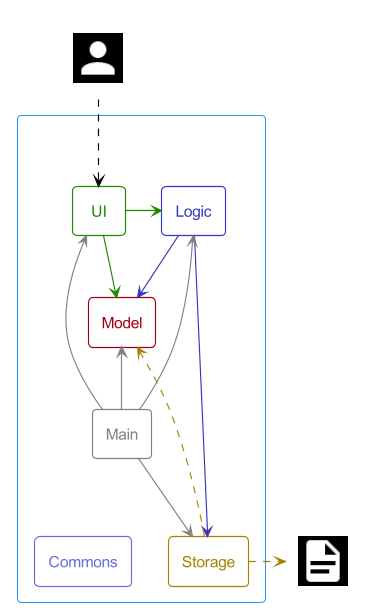
The Architecture Diagram given above explains the high-level design of the app.
Given below is a quick overview of the main components and how they interact with each other.
Main components of the architecture
Main has two classes called Main and MainApp. It is responsible for,
- At app launch: Initializes and connects the components in the correct sequence.
- At shut down: Shuts down the components and invokes cleanup methods where necessary.
The core of the App consists of four components.
-
UI: The UI of the App. -
Logic: The command executor. -
Model: Holds the data of the App in memory. -
Storage: Reads data from, and writes data to, the hard disk.
Lastly, Commons represents a collection of classes used by multiple other components.
How the architecture components interact with each other
The Sequence Diagram below shows how the components interact with each other for the scenario where the user issues the command delete 1.
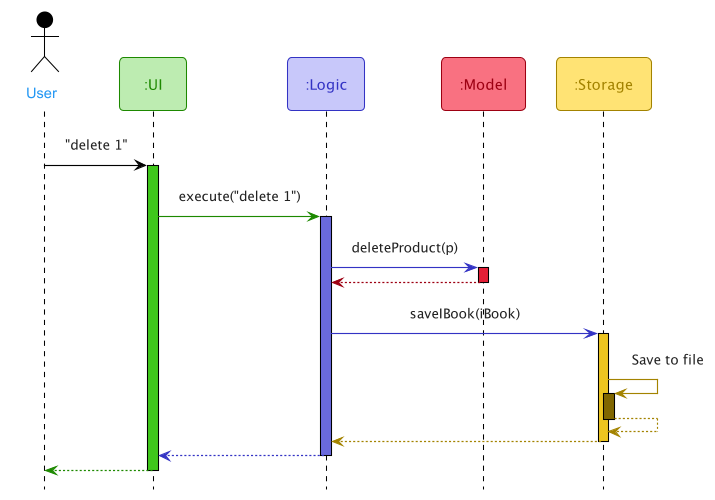
Each of the four main components (also shown in the diagram above),
- defines its API in an
interfacewith the same name as the Component. - implements its functionality using a concrete
{Component Name}Managerclass (which follows the corresponding APIinterfacementioned in the previous point.
For example, the Logic component defines its API in the Logic.java interface and implements its functionality using the LogicManager.java class which follows the Logic interface.
Other components interact with a given component through its interface rather than the concrete class (reason: to prevent outside components from being coupled to the implementation of a component), as illustrated in the (partial) class diagram below.
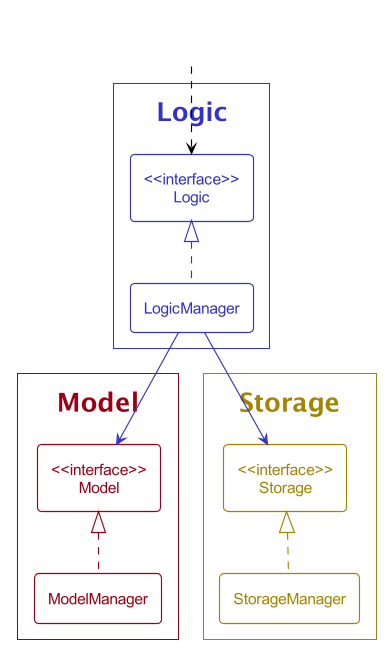
The sections below give more details about each component.
UI component
API: Ui.java.
The diagram below shows a simplified view of the UI component.
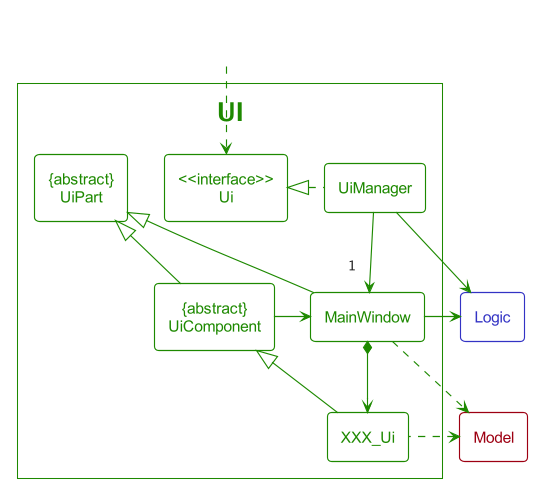
XXX_Ui represents CommandBox, ProductTable, PopupHandler, ControlBox, etc.
The UI consists of a UiManager that implements the Facade interface UI. UiManager consists of a MainWindow that holds all UI components of the application. UiComponent is an abstract class that contains a reference to the MainWindow.
By having XXX_Ui inherit from UiComponent, we allow navigation from XXX_Ui to MainWindow. The navigation is helpful for some UI components that need to call methods in UiManager.
For example, CommandBox calls the method executeCommand in MainWindow when the user enters a command.
The Table component
UI components that are related to the main display table are grouped under the Table package. The diagram below shows a simplified internal structure of Table.
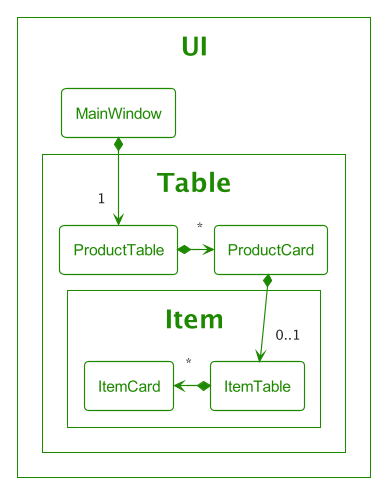
The MainWindow contains a ProductTable that holds multiple ProductCard objects that represent Product. Subsequently, each ProductCard may contain ItemTable which has multiple ItemCard objects to represent Item.
The Popup component
UI components that are related to a popup window are grouped under the Popup package. The diagram below shows a simplified internal structure of Popup.
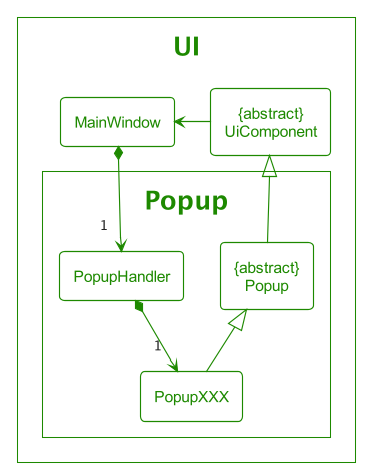
PopupXXX represents PopupAddProduct, PopupUpdateProduct, PopupAddItem, etc. The MainWindow contains a PopupHandler that provides APIs for operations related to a popup window.
Every popup inherits the Popup abstract class which contains the implementation of the common methods required in all popups, e.g show(), hide(), setFeedbackToUser(), etc.
The abstract class Popup inherits UiComponent for navigability to MainWindow.
The Control component
UI components that are related to the ControlBox are grouped under the Control package. The diagram below shows a simplified internal structure of Control.
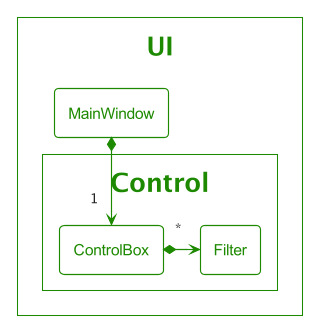
The ControlBox is the box located just above the main display table. It holds the  button and
 Filter tags.
The MainWindow contains a ControlBox that holds multiple Filter that represents each AttributeFilter.
More about UI
The UI component uses the JavaFX UI framework. The layout of these UI parts is defined in corresponding .fxml files that are in the src/main/resources/view folder. For example, the layout of the MainWindow is specified in MainWindow.fxml.
The CSS files can be found in src/main/resources/view/css.
The images used are located in src/main/resources/images.
The UI component,
- executes user commands using the
Logiccomponent. - listens for changes to
Modeldata so that the UI can be updated with the modified data. - keeps a reference to the
Logiccomponent, because theUIrelies on theLogicto execute commands. - depends on some classes in the
Modelcomponent, as it displaysProduct,Itemobject residing in theModel.
Logic component
API: Logic.java
The diagram below shows a simplified view of the Logic component.
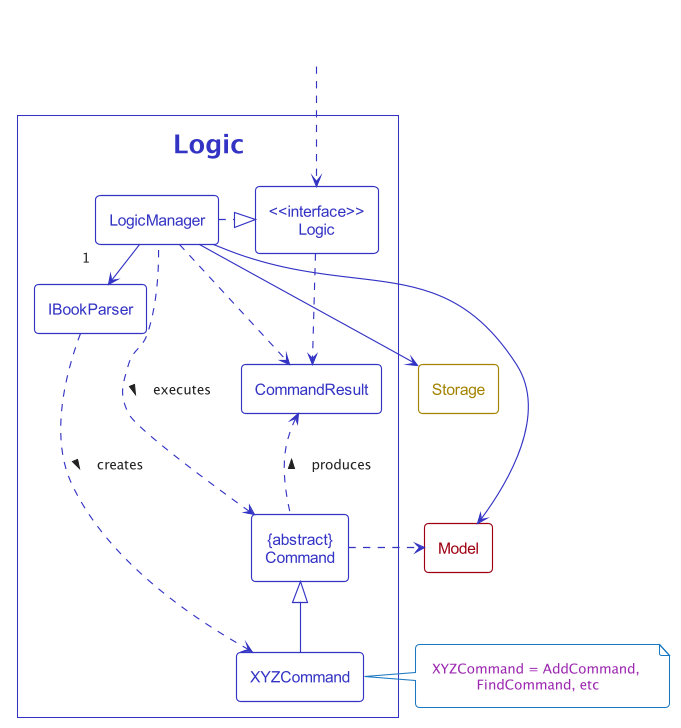
How the Logic component works:
- When
Logicis called upon to execute a command, it uses theIBookParserclass to parse the user command. - This results in a
Commandobject (more precisely, an object of one of its subclasses e.g.,AddCommand) which is executed by theLogicManager. - The command can communicate with the
Modelwhen it is executed (e.g. to add a product). - The result of the command execution is encapsulated as a
CommandResultobject which is returned fromLogic.
Commands are separated into different packages depending on their functionalities. Thus, the commands package includes the item package for item commands and the product package for product commands. The rest of the commands that do not fit into those two are directly under the command package.
The Sequence Diagram below illustrates the interactions within the Logic component for the execute("delete 1") API call.
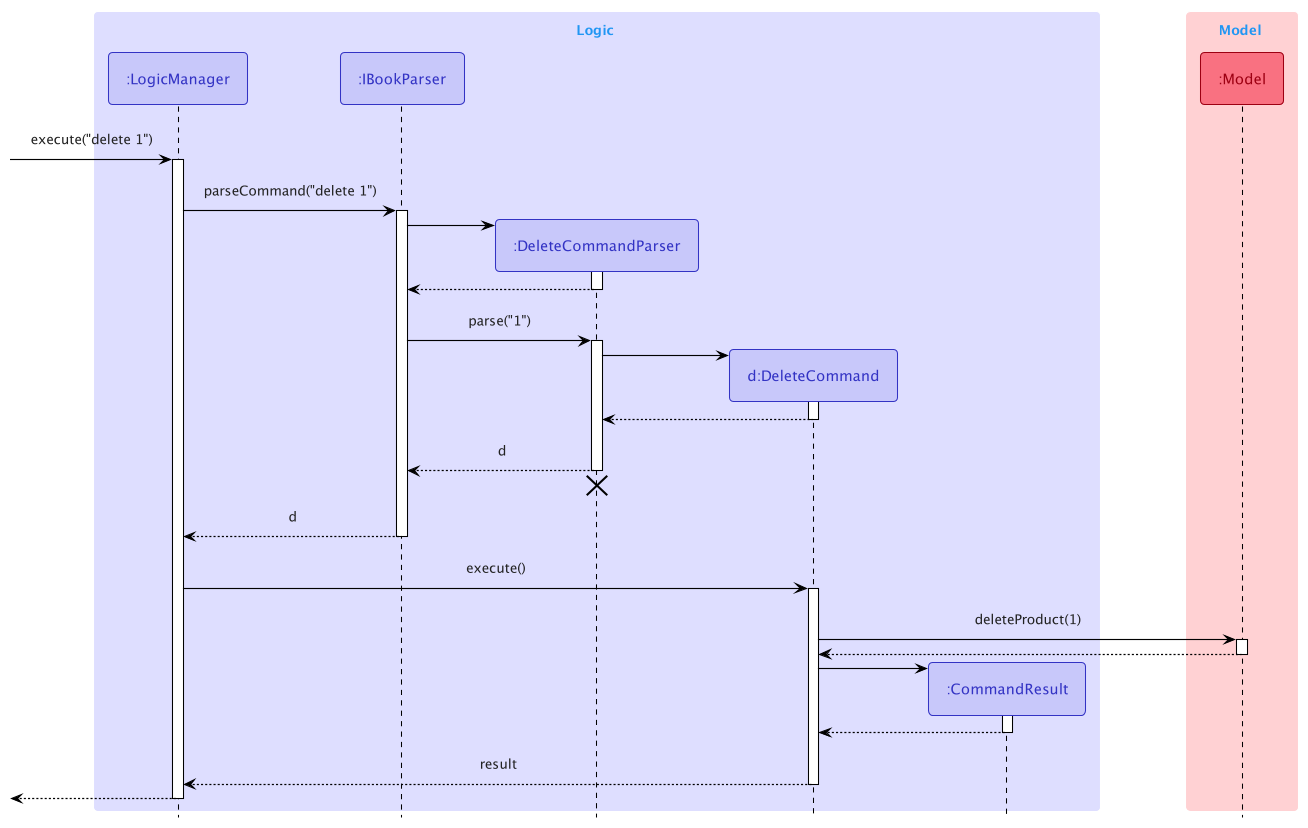
Note: The lifeline for DeleteCommandParser should end at the destroy marker (X). But due to a limitation of PlantUML, the lifeline reaches the end of the diagram.
Here are the other classes in Logic (omitted from the class diagram above) that are used for parsing a user command:
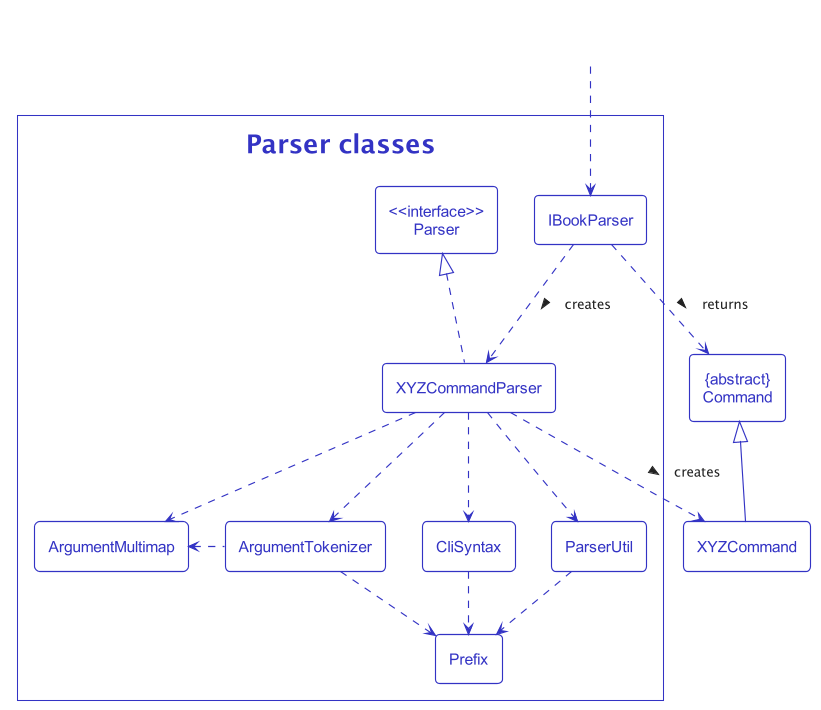
How the parsing works:
- When called upon to parse a user command, the
IBookParserclass creates anXYZCommandParser(XYZis a placeholder for the specific command name e.g.,AddCommandParser) which uses the other classes shown above to parse the user command and create anXYZCommandobject (e.g.,AddCommand) which theIBookParserreturns as aCommandobject. - All
XYZCommandParserclasses (e.g.,AddCommandParser,DeleteCommandParser, …) inherit from theParserinterface so that they can be treated similarly where possible e.g. during testing.
Model component
API: Model.java
The diagram below shows a simplified view of the Model component.
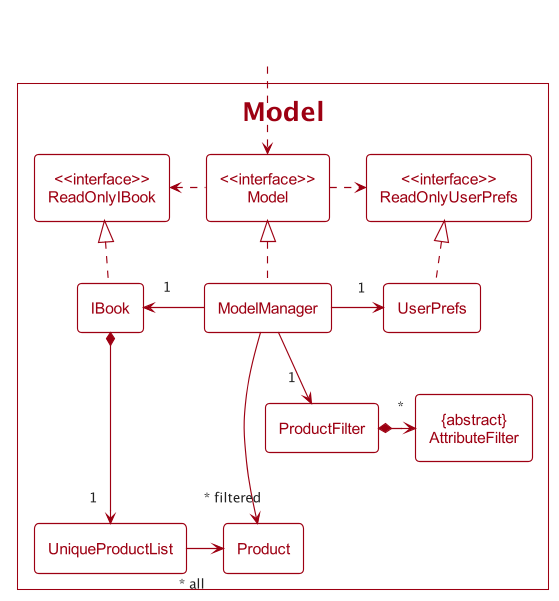
The Model component,
- stores the IBook data, i.e. all
Productobjects (which are contained in aUniqueProductListobject). - stores the currently ‘selected’
Productobjects (e.g., results of a search query) as a separate filtered list which is exposed to outsiders as an unmodifiableObservableList<Product>that can be ‘observed’ e.g. the UI can be bound to this list so that the UI automatically updates when the data in the list change. - stores the current
ProductFilterwhich is applied to the filtered list. - stores a
UserPrefsobject that represents the user’s preferences. This is exposed to the outside as aReadOnlyUserPrefsobject. - does not depend on any of the other three components (as the
Modelrepresents data entities of the domain, they should make sense on their own without depending on other components).
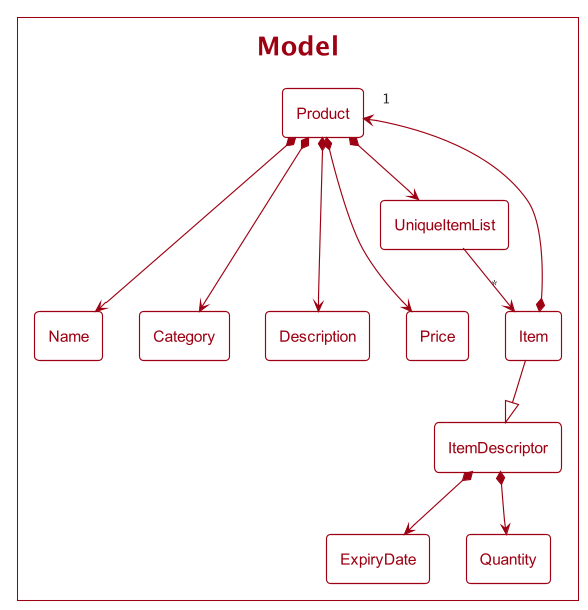
A more detailed representation of the Product class is shown below which includes more details regarding the Item class.
- The
Itemobject enforces a two-way relationship with aProduct. - An
Itemcan only belong to oneProduct, but aProductcan contain manyItemobjects.
Storage component
API: Storage.java
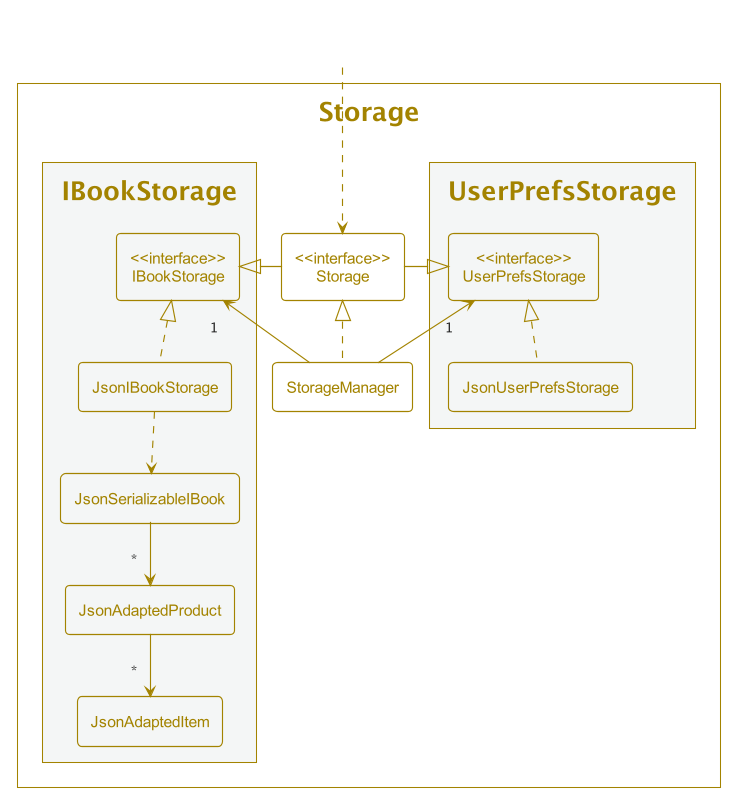
The Storage component,
- can save both IBook data and user preference data in JSON format, and read them back into corresponding objects.
- inherits from both
IBookStorageandUserPrefStorage, which means it can be treated as either one when only one functionality is needed. - depends on some classes in the
Modelcomponent (because theStoragecomponent’s job is to save/retrieve objects that belong to theModel).
Common classes
Classes used by multiple components are in the seedu.ibook.commons package.
Implementation
This section describes some noteworthy details on how certain features are implemented.
Popups
Implementation
The diagram below shows a simplified internal structure of Popup.
PopupXXX represents PopupAddProduct, PopupUpdateProduct, PopupAddItem, etc
The implementation of popups is facilitated by the PopupHandler class and the Popup abstract class. Each popup is contained by PopupHandler which provides APIs for operations related to the popup.
The API provided by PopupHandler are:
-
isShowing()– Checks if any one of the popups is showing. -
setFeedbackToUser(String)– Shows feedback to the user in the showing popup. -
showPopupXXX()– ShowsPopupXXX. -
hidePopup()– Hides the showing popup.
The showPopupXXX() method in PopupHandler will make sure that at most one popup is showing at a time. This is to prevent overcrowding the user’s screen.
Every popup is inherited from the Popup abstract class which contains the implementation of the common methods required in all popups.
The methods in Popup are:
-
show()— Shows the popup window. -
hide()— Hides the popup window. -
isShowing()— Checks if the popup is showing. -
setFeedbackToUser(String)— Shows feedback to the user in the popup. -
execute(String)— Executes the given command.
Showing a Popup
The following sequence diagram shows how a Popup is displayed once a button is clicked.
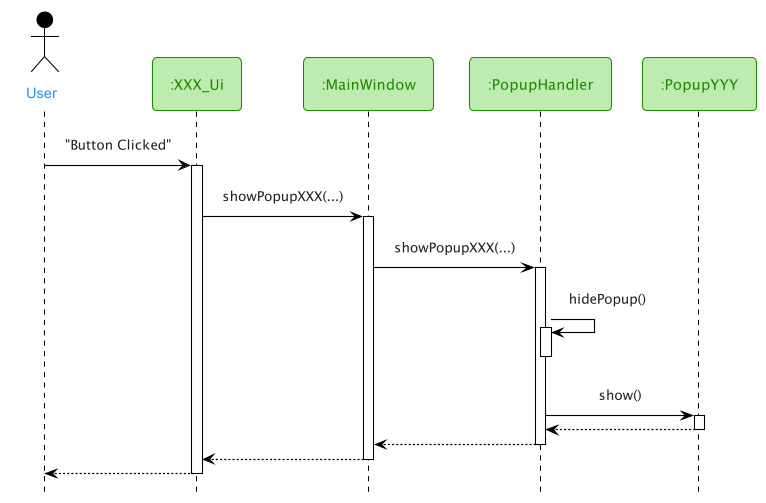
XXX_Ui represents UI components that have a button that will open a popup once clicked, e.g. ControlBox, ProductCard, ItemCard, etc.
PopupYYY represents different types of Popup, e.g. PopupAddProduct, PopupUpdateProduct, PopupAddItem, etc.
As seen from the diagram, the components call showPopupXXX(...) in MainWindow instead of calling it from PopupHandler directly.
This is to reduce coupling between the UI components by removing the dependency on PopupHandler to open a popup. Also, it avoids the issue of passing PopupHandler into a deeply nested UI component.
Executing commands in Popup
The sequence diagram below describes a successful execution of a command in a popup.
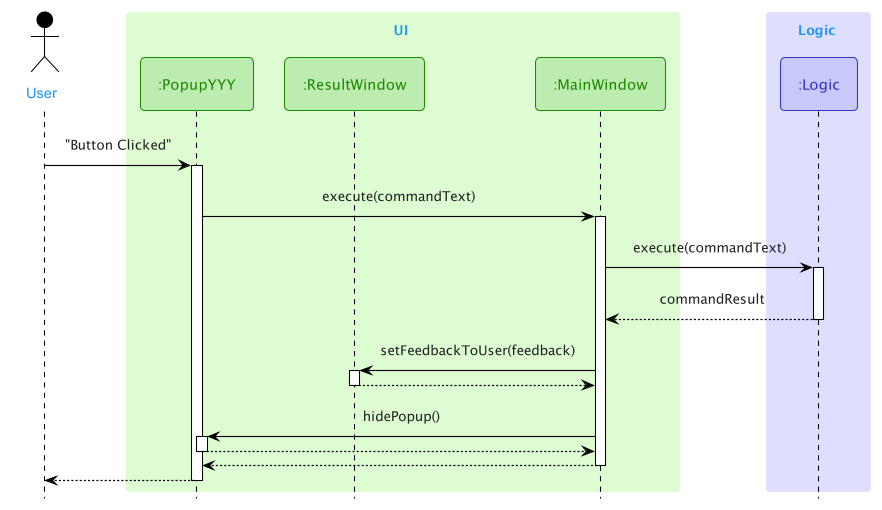
PopupYYY represents different types of Popup, e.g. PopupAddProduct, PopupUpdateProduct, PopupAddItem, etc.
When a user clicks a button in PopupYYY, the associated command is generated from the inputs. The command is then passed to MainWindow for execution. This process is similar to how a command is executed from CommandBox.
The commandResult will then be sent to ResultWindow for display and PopupYYY will be hidden.
Design Considerations
Aspect: How to handle popup
-
Alternative 1: Pass in popups created at
MainWindowto UI components that require it.- Pros: Fewer function calls and better performance.
- Cons: Increases coupling as these popups might be required by deeply nested components.
e.gItemCardhas to callPopupModifyItembut it resides inMainWindow > ProductTable > ItemTable. This causesProductTableandItemTableto have an unnecessary dependency onPopupModifyItem.
-
Alternative 2: Create a popup in UI components that require it.
- Pros: Easy solution to reduce coupling.
- Cons:
- Difficult to manage pop-ups and check whether the popups are currently showing.
- Two of the same popups can be opened at the same time.
-
Alternative 3 (current choice): Create
PopupHandlerinMainWindowand provide methods for all UI components to open aPopup.- Pros: Centralized control for pop-ups and reduces coupling.
- Cons:
- Increases complexity for
MainWindow. - Less efficient, as more function calls are required.
- Increases complexity for
Product
Implementation
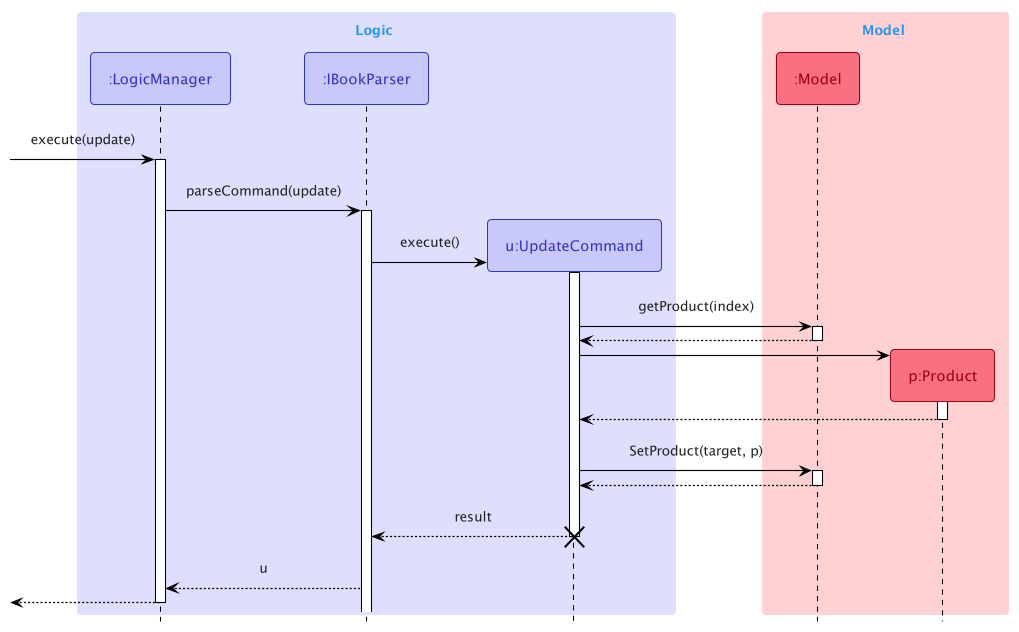
The implementation of product is entirely governed by the Product class. The Product class is immutable and guarantees that all fields are valid and immutable as well.
Thus updating a product will create a new Product object. The items from the original Product will be copied entirely into the new Product object.
The following sequence diagram shows how the Update command works:
Design Considerations
Aspect: How to design the Product structure
-
Alternative 1: Make
Productmutable.- Pros: Easy to implement.
- Cons: Hard to track state in undo/redo feature.
-
Alternative 2 (current choice): Make
Productimmutable.- Pros: Removes the need for listeners for UI to track product states.
- Cons: The cost of updating a product may be huge.
Product filters
Implementation
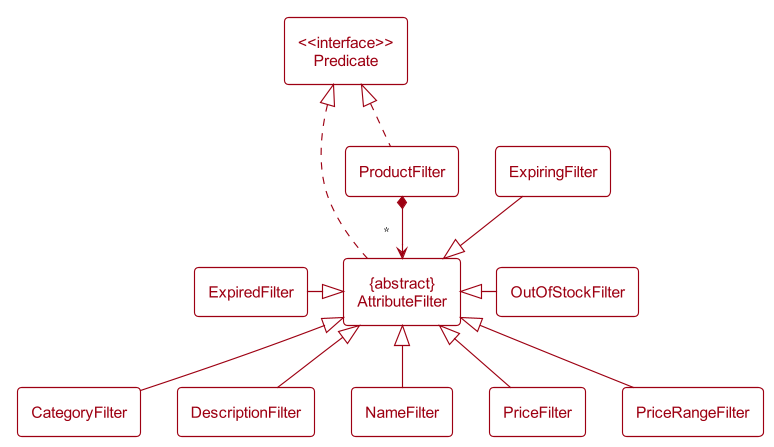
The implementation of product filter is facilitated by the ProductFilter class and the AttributeFilter class. ProductFilter contains a list of AttributeFilter which specifies the filter for the individual attributes of a product that was queried in the Find command.
Both the ProductFilter as well as the AttributeFilter has a test() method to test whether a given Product fulfils the query specified by the user.
Given below is the class diagram of the ProductFilter class and the AttributeFilter class.
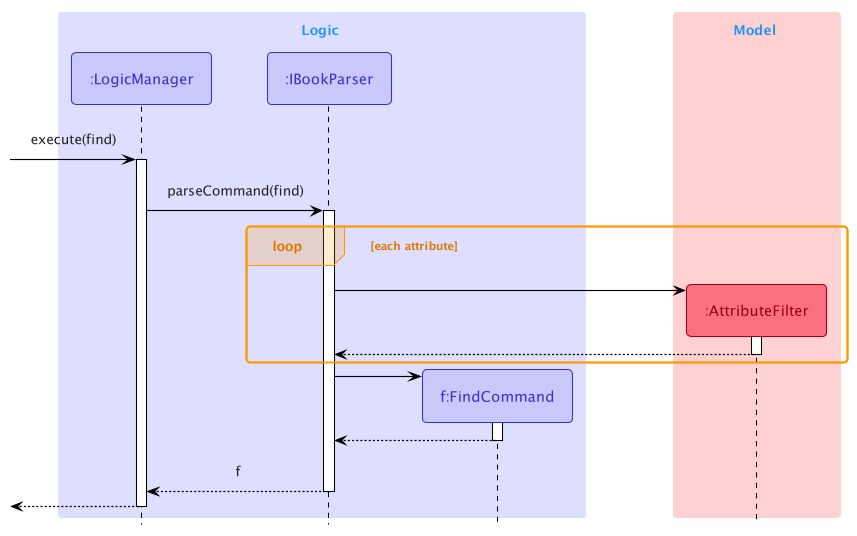
The sequence diagram below shows how the FindCommand object is created:
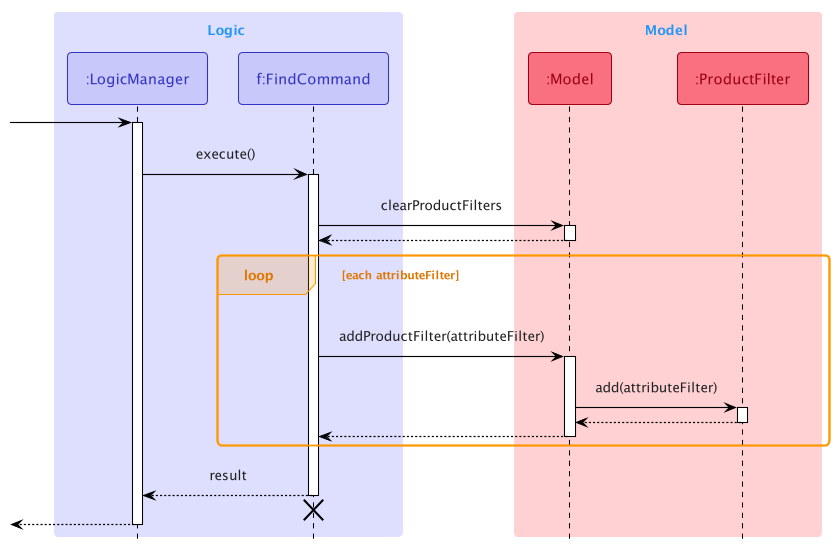
The sequence diagram below shows how the FindCommand object is executed:
As different attributes have different constraints, the parse() method in the FindCommandParser checks that all the attributes are valid before creating the AttributeFilter and the FindCommand objects. If there are any invalid attributes, an exception would be thrown.
When executing the FindCommand, the clearProductFilters() method of the Model would be called to ensure that previous filters are removed. The individual AttributeFilters would then be applied by calling the addProductFilter() method in the Model class. This would then update the list of filtered products by checking if the product fulfils every condition in the AttributeFilter (i.e. returning true for when the test() method is called with Product as the argument).
The updated filtered product list would then be displayed in the GUI.
 Tip: Some
 AttributeFilters like NameFilter, CategoryFilter and DescriptionFilter have the capability to do partial matching so the query given does not have to exactly match the actual product.
Design considerations
Aspect: How to filter the products:
-
Alternative 1: Create a single predicate as the product filter.
- Pros: Easy to implement.
- Cons: The user does not have fine-grained control over the current filter.
-
Alternative 2 (current choice): Create a
ProductFilterthat contains a list ofAttributeFilter- Pros: Allow the UI to display the individual
AttributeFilterbeing applied and delete any one of them individually. - Cons: More complicated to implement.
- Pros: Allow the UI to display the individual
Item
Implementation
The Item class is implemented to encapsulate two data fields, ExpiryDate and Quantity. Product has a one-to-many relationship with Item, i.e. one Product can have multiple Item objects under it.
Listed below are the few behavioural requirements for Item, along with the classes/interfaces related to it.
- A
Productmust not have twoItemobjects that are considered the same, this is enforced byUniqueItemList. - An
Itemwithout aParentis characterised using theItemDescriptor.
ItemDescriptor contains an ItemDescriptor#toItem(Product) method to ensure the associated Product is given before creating the Item object.
The motivation for such implementation is due to the parsing of the add-item command when the fields of Item need to be populated before the associated Product is retrieved. We wanted to enforce the relationship between Item and Product to reduce unforeseen misuses and bugs.
Adding an Item
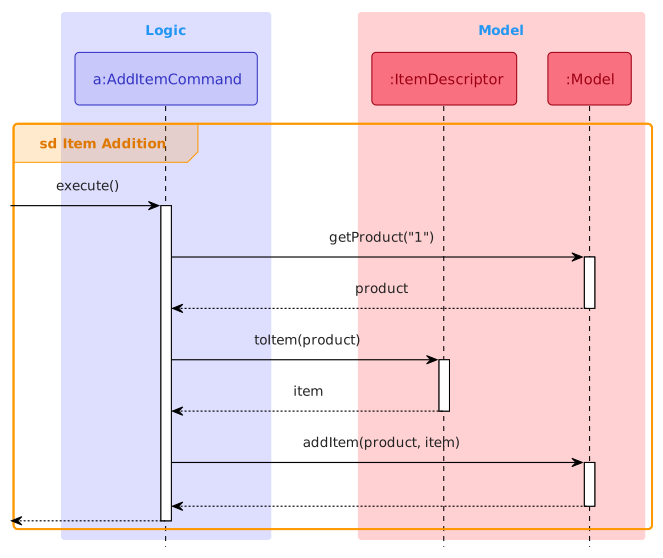
The sequence diagram below shows how add-item 1 e:2022-12-13 q:10 is handled:
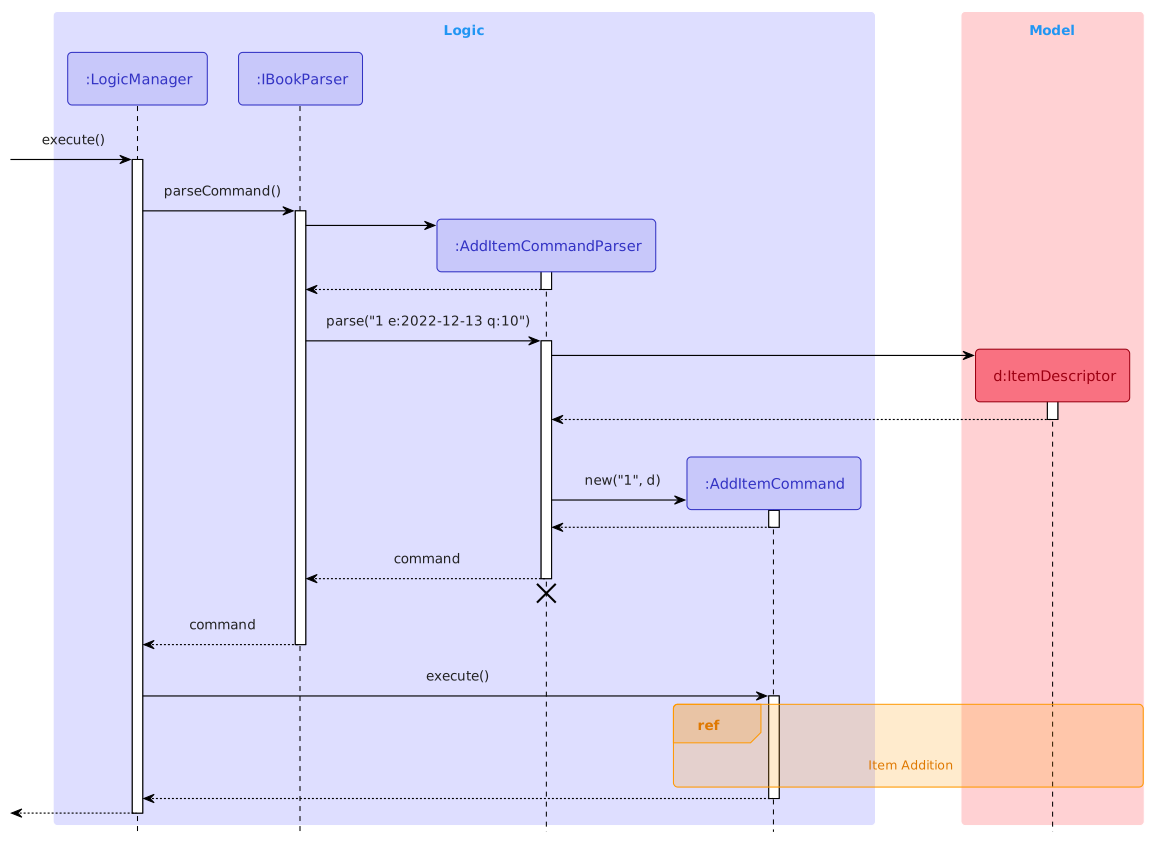
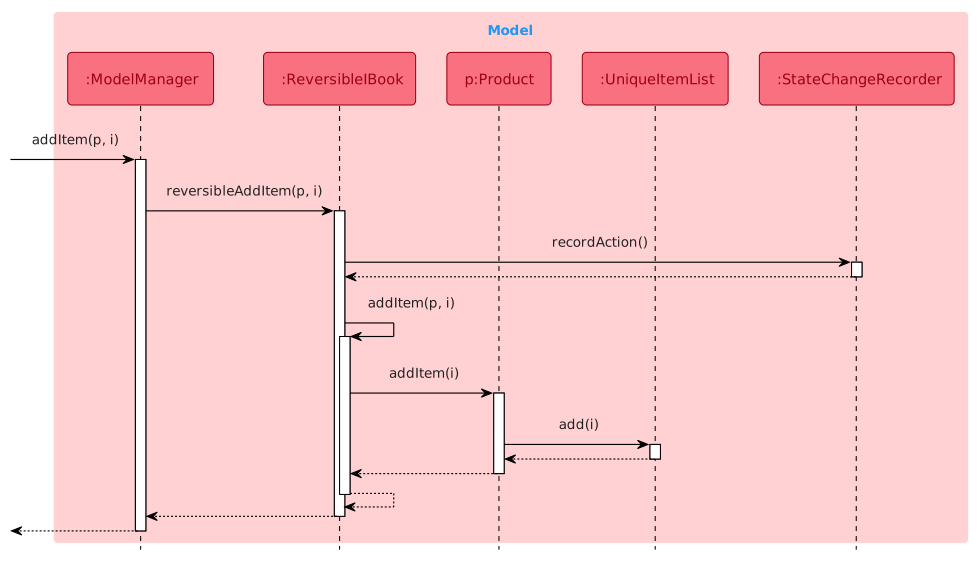
The sequence diagram below shows how an Item is added to a Product’s UniqueItemList. This happens within ModelManager which implements the interface Model containing the method Model#addItem(Product, Item).
Updating and deleting an Item
These two operations are similar to adding an Item as shown in the section above.
Design considerations
Aspect: How to create Item during the parsing of an add-item command:
-
Alternative 1: Retrieve the respective
Productwithin the parser.- Pros: Easy solution.
-
Cons: Allows the parser to interact with model and logic, and increases coupling.
-
Alternative 2: Create a command object with each field as a parameter.
- Pros: Easy solution.
-
Cons: Complicates the
AddItemCommandconstructor and requires modification of constructor signature whenever there are updates toItemfields.
-
Alternative 3 (current choice):
ItemDescriptorto temporarily hold the fields’ value, then converted toItemlater whenProductis specified.- Pros: Good abstraction.
- Cons: Requires an extra class to be created.
Undo/redo feature
Implementation
The undo/redo mechanism is facilitated by ReversibleIBook. It extends IBook with versions of methods that are reversible and uses StateChangeRecorder to record all changes made to IBook, which internally stores changes as StateChange. ReversibleIBook implements the following operations:
-
prepareForChanges()— Prepares a clean workspace to record the next possible changes. -
saveChanges()— Saves all changes made toIBookas aStateChangeintoStateChangeRecorder. -
undo()— Reverts the most recent changes. -
redo()— Restores the most recently undone changes.
These operations are exposed in the Model interface as Model#prepareIBookForChanges(), Model#saveIBookChanges(), Model#undoIBook() and Model#redoIBook() respectively.
Given below is an example usage scenario and how the undo/redo mechanism behaves at each step.
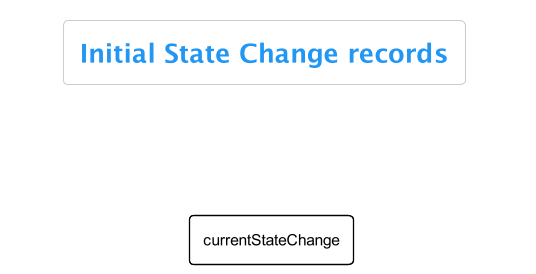
Step 1. The user launches the application for the first time. The ReversibleIBook will be initialized, which in turn initializes StateChangeRecorder with a stateChanges list consisting of zero StateChange records.
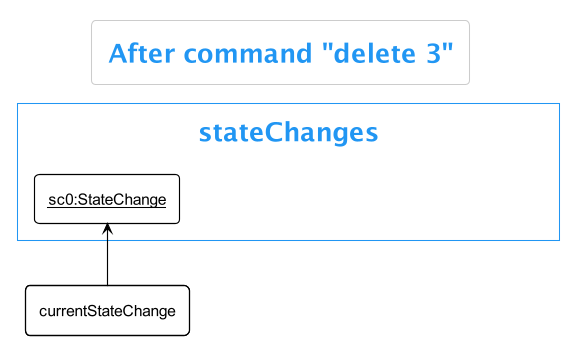
Step 2. The user executes delete 3 command to delete the 3rd product in the iBook. The delete command calls Model#saveIBookChanges() after its execution, causing changes made to iBook to be recorded as a StateChange and stored in the stateChanges list. The currentStateChange is now pointing to this most recent StateChange.
Step 3. The user executes add n:Maggie p:2.00 to add a new product. This command also calls Model#saveIBookChanges(), causing another StateChange to be saved into the stateChanges list.
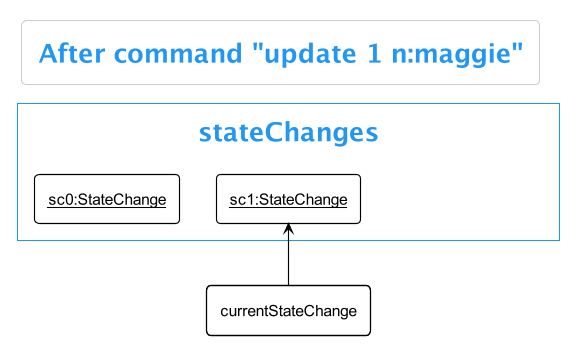
Note: If a command fails its execution, it will not call Model#saveIBookChanges(), so no StateChange will be saved into the stateChanges list.
Step 4. The user now decides that adding the product was a mistake, and decides to undo that action by executing the undo command. The undo command will call Model#undoIBook(), which will get and execute the actions needed to revert this change. currentStateChange will then move once to the left, pointing to the most recent stateChange (with respect to the state of IBook after the undo command).
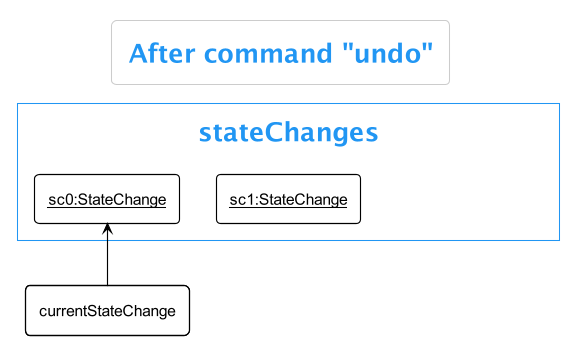
Note: If the currentStateChange is not pointing to a valid StateChange (for example when there is no record in the stateChanges list), then there are no changes to revert. The undo command uses Model#canUndoIBook() to check if this is the case. If so, it will return an error to the user rather than attempting to perform the undo.
The following sequence diagram shows how the undo operation works:
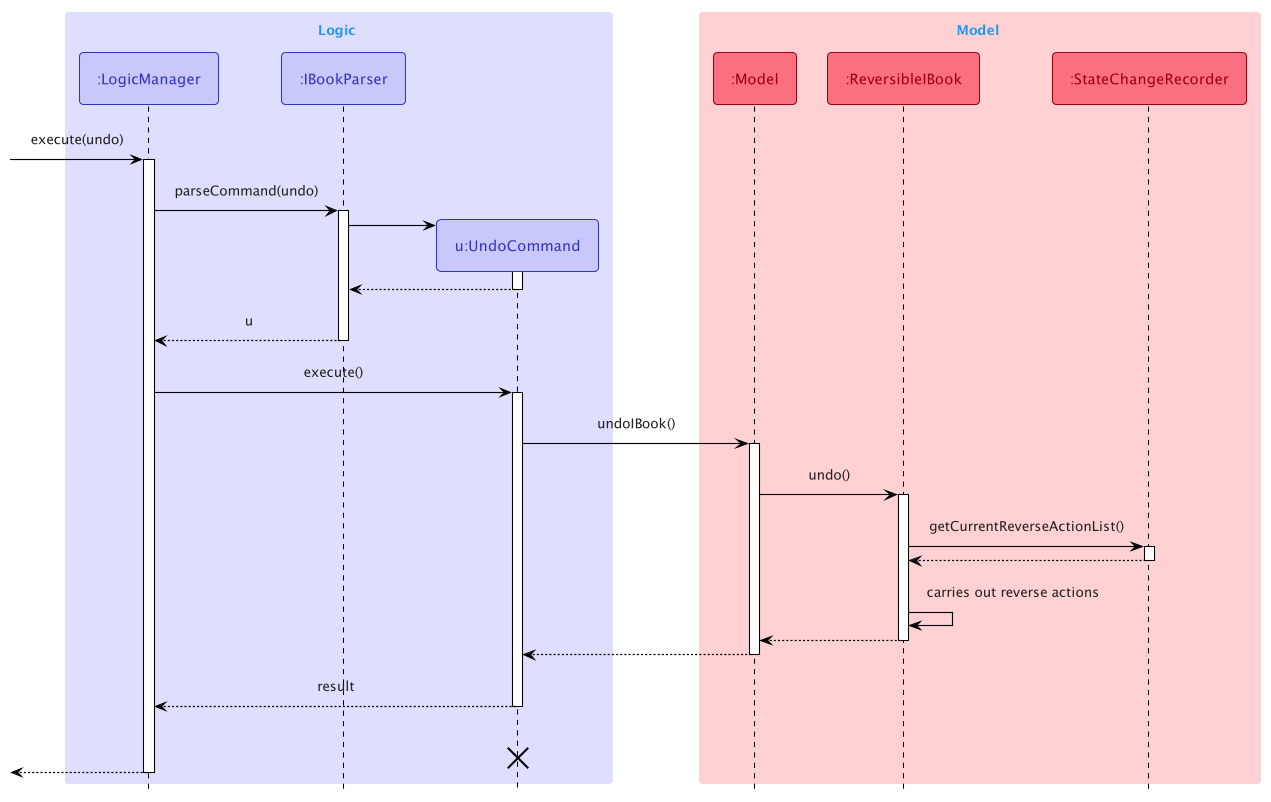
The redo command does exactly the opposite — it calls Model#redoIBook(), which moves the currentStateChange to the right by one, pointing to the previously reverted changes, then performs the actions needed to restore them.
Note: If the currentStateChange is pointing at the latest record of the stateChanges list, then there are no reverted changes to restore. The redo command uses Model#canRedoIBook() to check if this is the case. If so, it will return an error to the user rather than attempting to perform the redo.
Step 5. The user then decides to execute the command list. Commands that do not make any changes to IBook, such as list, will not call Model#saveIBookChanges(). Thus, state change records in StateChangeRecorder remain unchanged.
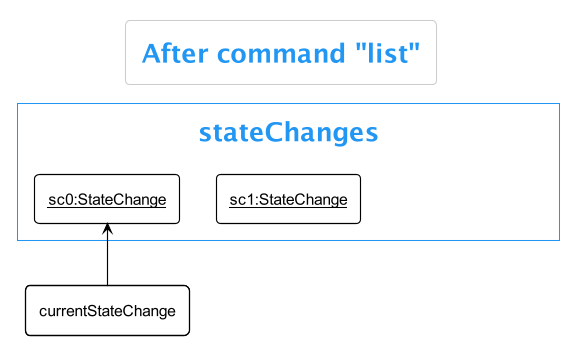
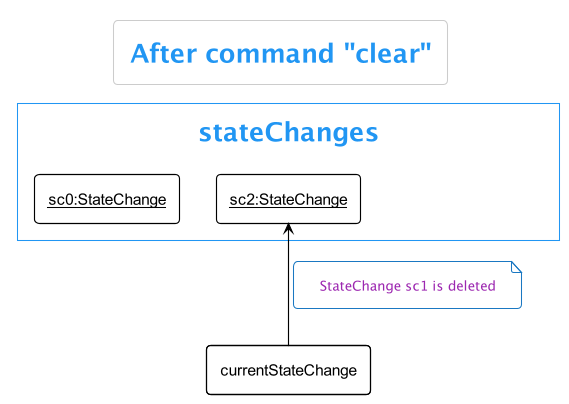
Step 6. The user executes clear, which again will call Model#saveIBookChanges() at the end of its execution. Since the currentStateChange is not pointing at the end of the stateChanges list, all state changes after the currentStateChange will be cleared.
Reason: It does not make sense to redo the add n:Maggie p:200 command. This is the convention that most modern desktop applications follow.
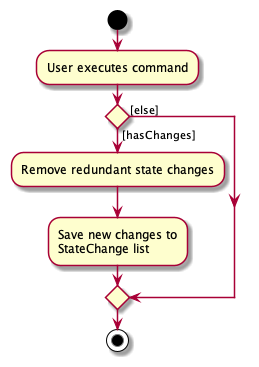
The following activity diagram summarizes what happens when a user executes a new command:
Design considerations:
Aspect: How undo & redo executes:
-
Alternative 1: Save the entire
iBook.- Pros: Easy to implement.
- Cons: May have performance issues in terms of memory usage.
-
Alternative 2 (current choice): Methods that make changes to
iBookhave corresponding reverse actions.- Pros: Uses less memory (e.g. for
delete, just save the product being deleted). - Cons: We must ensure that the implementation of each method is correct.
- Pros: Uses less memory (e.g. for
Link to guides
Appendix: Requirements
Product scope
Target user profile: A storekeeper who
- has a need to manage different products in the store.
- is comfortable with CLI but prefers GUI for certain occasions.
- is forgetful and easily loses track of expiry dates in a store.
- is forgetful and sometimes forgets command syntax.
- prefers desktop apps over other types.
Value proposition: Manage products and their expiry dates with ease using CLI.
User stories
Priorities: High (must have) - * * *, Medium (nice to have) - * *, Low (unlikely to have) - *
| Priority level | As a … | I want to … | So that I can… |
|---|---|---|---|
* * * |
user | add a product | input product data that I want to store |
* * * |
user | list all products added | check on all important details of all items at once |
* * * |
user | search for specific products by category | find the relevant products and its details quickly |
* * * |
user | delete a product | remove entries that I no longer need |
* * * |
user | update a product’s information | keep the details relevant |
* * |
beginner user | learn about the basic features | quickly get started with using the app |
* * |
user | get reminders on which stocks are nearing the expiry dates | prioritize their sales |
* * |
user familiar with the app | receive orders from an item and update in the app | easily manage large orders of several products |
* * |
user familiar with the app | add customer records | keep track of their spending habits |
* * |
user familiar with the app | archive customer records | ignore customers that are no longer active |
* * |
professional user | automate the reduction of the price of items when near the expiry dates | easily sell out the products via a discount |
* |
user | import existing products to the application | transition to this app quickly |
* |
user familiar with the app | create multiple accounts for my staff to use | restrict the access rights that they have |
* |
user familiar with the app | delete staff accounts | prevent staff no longer working from using the account |
* |
user familiar with the app | add custom permissions for the staff accounts | modify their access rights related to their job scope |
* |
professional user | create and use my own shortcut commands | accomplish my task faster |
Use cases
For all use cases below, the System is the IBook and the Actor is the user, unless specified otherwise.
UC1: Listing products
MSS
- User requests to list all products.
-
IBook removes all active filters and shows the list of products.
Use case ends.
Extensions
-
1a. The list is empty.
-
1a1. IBook shows an empty table.
Use case ends.
-
UC2: Adding a product
MSS
- User requests to add a product to iBook.
-
IBook adds the product.
Use case ends.
Extensions
-
1a. Required fields are all present but are invalid.
-
1a1. IBook shows an error message.
Use case ends.
-
-
1b. Not all required fields are present (e.g. Name).
-
1b1. IBook shows an error message.
Use case ends.
-
-
1c. Optional fields like Category are missing.
-
1c1. IBook automatically sets the category to miscellaneous.
Use case resumes at step 2.
-
UC3: Delete a product
MSS
- User requests to list products (UC1).
- User requests to delete a product in the list specified by the index.
-
IBook deletes the product.
Use case ends.
Extensions
-
2a. Index is not provided.
-
2a1. IBook shows an error message.
Use case ends.
-
-
2b. The given index is invalid.
-
2b1. IBook shows an error message.
Use case ends.
-
UC4: Update a product
MSS
- User requests to list products (UC1).
- User requests to update a product in the list specified by the index.
-
IBook updates the product.
Use case ends.
Extensions
-
2a. Index is not provided.
-
2a1. IBook shows an error message.
Use case ends.
-
-
2b. The given index is invalid.
-
2b1. IBook shows an error message.
Use case ends.
-
UC5: Find products
MSS
- User requests to find products by providing filters.
-
IBook updates the list to show the requested products.
Use case ends.
Extensions
-
1a. Requested fields are invalid.
-
1a1. IBook shows an error message.
Use case ends.
-
-
1b. No product matches the given filter.
-
1b1. IBook shows a cute image stating nothing found.
Use case ends.
-
UC6: Find out of stock products
MSS
- User requests to find products that are out of stock.
-
IBook updates the list to show the requested products.
Use case ends.
Extensions
-
1a. No products found.
-
1a1. IBook shows a cute image stating nothing found.
Use case ends.
-
UC7: Add an item
MSS
- User requests to list products (UC1)
- User requests to add an item to a product in IBook.
-
IBook adds the item to the product.
Use case ends.
Extensions
-
2a. Required fields are all present but are invalid.
-
2a1. IBook shows an error message.
Use case ends.
-
-
2b. Not all required fields are present (e.g. Expiry Date, Quantity).
-
2b1. IBook shows an error message.
Use case ends.
-
UC8: Delete an item
MSS
- User requests to list products (UC1).
- User requests to delete an item in the list specified by the index.
-
IBook deletes the item.
Use case ends.
Extensions
-
2a. Index is not provided.
-
2a1. IBook shows an error message.
Use case ends.
-
-
2b. The given index is invalid.
-
2b1. IBook shows an error message.
Use case ends.
-
UC9: Update an item
MSS
- User requests to list products (UC1).
- User requests to update an item in the list specified by the index.
-
IBook updates the product.
Use case ends.
Extensions
-
2a. Index is not provided.
-
2a1. IBook shows an error message.
Use case ends.
-
-
2b. The given index is invalid.
-
2b1. IBook shows an error message.
Use case ends.
-
-
2c. The fields provided are invalid
- 2c1. IBook shows an error message.
Use case ends.
UC10: Find items
MSS
- User requests to find items by providing filters.
-
IBook updates the list to show the requested items.
Use case ends.
Extensions
-
1a. Requested fields are invalid.
-
1a1. IBook shows an error message.
Use case ends.
-
-
1b. No product matches the given filter.
-
1b1. IBook shows a cute image stating nothing found.
Use case ends.
-
UC11: Find expired items
MSS
- User requests to find items that are expired.
-
IBook updates the list to show the requested items.
Use case ends.
Extensions
-
1a. No items found.
-
1a1. IBook shows a cute image stating nothing found.
Use case ends.
-
UC12: Find expiring items
MSS
- User requests to find items that are expiring within a certain amount of days
-
IBook updates the list to show the requested items
Use case ends.
Extensions
-
1a. Number of days is invalid.
-
1a1. IBook show an error message.
Use case ends.
-
-
1b. No items found.
-
1b1. IBook shows a cute image stating nothing found.
Use case ends.
-
UC13: Update all products
MSS
- User finds products they want to update using the find command (UC5).
- User requests to update all products displayed in the list.
-
IBook updates the list to show all products updated.
Use case ends.
Extensions
-
2a. Some provided fields are invalid.
-
2a1. IBook shows an error message.
Use case ends.
-
-
2b. The current display list is empty.
-
2b1. IBook shows an error message.
Use case ends.
-
UC14: Delete all products
MSS
- User finds products they want to delete using the find command (UC5).
- User requests to delete all products displayed in the list.
-
IBook updates the list to show all products updated.
Use case ends.
Extensions
-
2a. The current display list is empty.
-
2a1. IBook shows an error message.
Use case ends.
-
UC15: Undo changes
MSS
- User requests to undo the most recent command that made changes to iBook.
-
IBook revert the most recent changes.
Use case ends.
Extensions
-
1a. There are no changes that can be reverted.
-
1a1. IBook shows an error message.
Use case ends.
-
UC16: Redo changes
MSS
- User requests to redo the most recent undone command that made changes to iBook.
-
IBook restore the most recent undone changes.
Use case ends.
Extensions
-
1a. There are no changes that can be restored.
-
1a1. IBook shows an error message.
Use case ends.
-
Non-Functional Requirements
- Should work on any mainstream OS as long as it has
Java 11or above installed. - Should be able to hold up to 1000 products without a noticeable sluggishness in performance for typical usage.
- A user with above-average typing speed for regular English text (i.e. not code, not system admin commands) should be able to accomplish most of the tasks faster using commands than using the mouse.
- Data should be auto-saved locally each time a new command has been entered.
- Should reload saved data accurately provided that data is not corrupted.
- The System should respond within 3 seconds.
Glossary
- Mainstream OS: Windows, Linux, Unix, OS-X
Appendix: Instructions for manual testing
Given below are instructions to test the app manually.
Note: These instructions only provide a starting point for testers to work on;
testers are expected to do more exploratory testing.
Launch and shutdown
-
Initial launch
-
Download the
.jarfile and copy it into an empty folder. -
Double-click the jar file. If double clicking doesn’t work, type java -jar ibook.jar in a terminal in the same directory as the jar file
Expected: Shows the GUI with a set of sample products. The window size may not be optimum.
-
-
Saving window preferences
-
Resize the window to an optimum size. Move the window to a different location. Close the window.
-
Re-launch the app by double-clicking the jar file or running
java -jar ibook.jar.
Expected: The most recent window size and position on the screen are retained.
-
Deleting product(s)
-
Deleting a product while all products are being shown
Prerequisites: List all products using the
listcommand. Multiple products in the list.-
Test case:
delete 1
Expected: First product is deleted from the list. Details of the deleted product are shown in the command output window. -
Test case:
delete 0
Expected: No product is deleted. Error details are shown in the command output window. -
Other incorrect delete commands to try:
delete,delete x,...(where x is larger than the list size)
Expected: Similar to previous.
-
-
Deleting all products
Prerequisites: There are existing products in the table.
- Test case:
delete-all
Expected: All products shown in the table will be deleted. This can be verified by usinglistcommand to show all products in iBook.
- Test case:
Updating product(s)
-
Updating a product while all products are being shown
Prerequisites: List all products using the
listcommand. Multiple products in the list.-
Test case:
update 1 d:update description
Expected: First product in the list is updated. Its description will now becomeupdate description. -
Test case:
update 2 p:100.99 d:another description
Expected: Second product in the list is updated. Its price and description will now become100.99andanother descriptionrespectively. -
Test case:
update 0 p:9.99
Expected: No product is updated. Error details are shown in the result window. -
Other incorrect update commands to try:
update,update x,...(where x is larger than the list size)
Expected: Similar to previous.
-
-
Updating all products
Prerequisites: There are existing products in the table.
- Test case:
update-all p:19.99 d:Stock clearance sales
Expected: All products shown in table will be updated to have a price of$19.99and descriptionStock clearance sales.
- Test case:
Finding products
-
Find products that match certain attributes like (
NAME,CATEGORY,DESCRIPTION,PRICE)Prerequisites: There are existing products in the table.
-
Test case:
find n:kaya
Expected: Products that containkayain the name are displayed. Details such as the number of products found would be shown in the status message. -
Test case:
find n:kaya c:bread
Expected: Products that containkayain the name andbreadin the category is displayed. Details such as the number of products found would be shown in the status message. -
Test case:
find
Expected: Error detail is shown in the command output window as at least one attribute needs to be specified in the command. -
Other incorrect find commands to try:
find blabla
Expected: Similar to previous.
-
-
Find products that are out of stock
Prerequisites: There are existing products in the table.
- Test case:
out-of-stock
Expected: Products that have no items would be displayed.
- Test case:
-
Find items that have expired
Prerequisites: There are existing products in the table.
- Test case:
expired
Expected: Products that contain expired items would be displayed.
- Test case:
-
Find items that are expiring
Prerequisites: There are existing products and items in the table.
-
Test case:
remind 5
Expected: Items that are expiring within the next 5 days would be displayed. -
Test case:
remind 0
Expected: Items that are expiring on the same day would be displayed. -
Test case:
remind -1
Expected: Error detail is shown in the command output window as the days specified cannot be negative. -
Other incorrect commands to try:
remind blabla,remind 9999999999999
Expected: Similar to previous.
-
Undo/redo changes
-
Undo changes
Prerequisites: There are existing products in the table. At least one command that makes changes to iBook (e.g.
add/update/delete) has been performed.-
Test case:
undo
Expected: The most recent change made to iBook is reverted. -
Test case:
add n:new_product p:3.00thenundo
Expected: Thenew_productjust added will be deleted. -
Test case:
undo haha
Expected: Any additional input after the keywordundowill be ignored as if this is a normalundocommand.
-
-
Redo changes
Prerequisites: A
undocommand has just been successfully executed.-
Test case:
redo
Expected: The just undone changes will be redone again. -
Test case:
add n:new_product p:3.00thenundothenredo
Expected: Thenew_productjust deleted by theundocommand will be added back again. -
Test case:
redo haha
Expected: Any additional input after the keywordredowill be ignored as if this is a normalredocommand.
-
Saving data
-
Dealing with missing/corrupted data files
Prerequisites: iBook is not currently running.
-
Locate the data file of iBook at
[JAR file location]/data/ibook.json. -
Delete the file or replace the data in it with random garbage values.
Expected: The following launch of iBook will load in sample products.
-